Building Lanco: my first experiment with AI-assisted development
I got very into the idea of building a freelance management tool at exactly the moment when building software with AI started being an actual proposition rather than a parlour trick. Whether this was good timing or whether I only noticed the gap because I was suddenly able to fill it in a weekend is a question I have not fully resolved.
What I wanted to test was not whether AI could produce code — it obviously can — but whether it could be directed precisely enough to produce something genuinely production-grade. The gap that matters is not between what AI can do and what humans can do. It is between prompting declaratively and prompting imperatively. Tell an AI to "build a freelance management tool" and you get something that looks plausible in a screenshot and falls apart the moment you have multiple clients, currencies, and a self-assessment deadline bearing down on you. Specify the data model, the state transitions, the approach to Supabase row-level security, and the edge cases in multi-currency invoicing, and you get something different. The AI is not guessing at the architecture any more; it is implementing one. The difference between a toy and a product is whether the person directing the AI already knows what good looks like before they ask.
Lanco is the result of finding out whether that difference is real.
What Lanco does
A freelance management tool built to address my own problem: nothing available was quite right, and I now had a way of building things without waiting for a gap in the calendar that was never going to arrive.
Projects and clients
Organised in one place, with custom day rates and clear structure
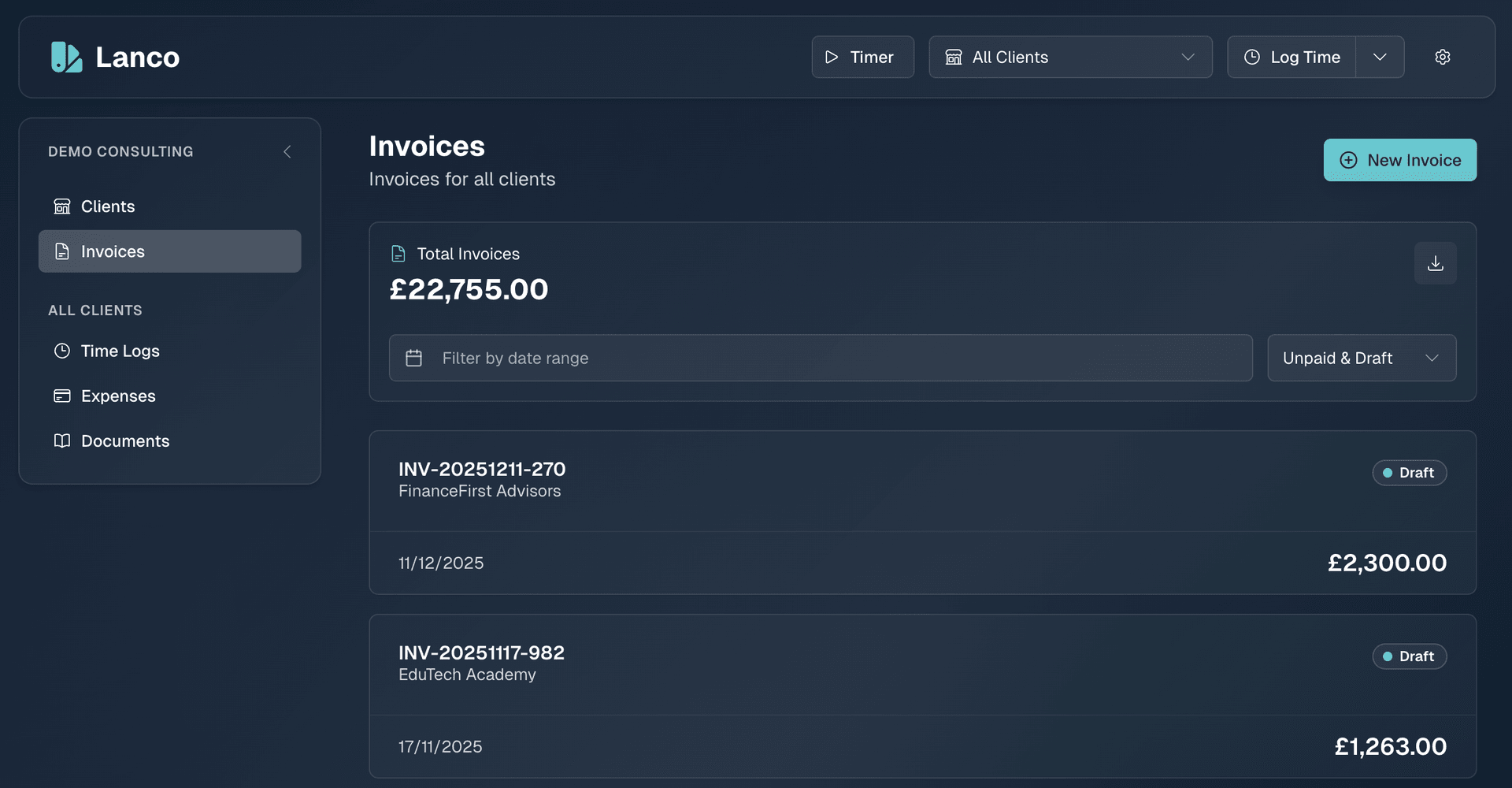
Time logs and invoices
Tracked hours flow naturally into invoices in a single click
Expense tracking
By category and client, so you know exactly where the money goes
MTD reporting
With CSV exports ready for HMRC submission
AI-powered documentation
Proposals, contracts, and other documents generated and refined in context
Multi-currency support
Historical exchange rates and inline reporting, without screaming for attention
The interface is mobile-first and deliberately minimal. Not the feature-bloated enterprise tool with seven hundred settings nobody has touched since onboarding, and not the bare-bones tool that falls apart the moment you have more than one client or an invoice in a currency you did not plan for. Just what is actually needed, built to behave like one coherent product rather than a collection of features bolted together and shipped on a Friday.
AI builds to spec, not to delight
AI is excellent at producing functional code. It can scaffold features, wire up APIs, and handle the plumbing faster than any human. What it cannot do is care about how any of it feels.
Left to its own devices, AI produces interfaces that work but do not feel right. Animations are either missing or copied from whatever pattern was most common in the training data. The micro-interactions that make software feel considered — the subtle hover states, the satisfying invoice confirmation, the smooth transition between views — none of that comes naturally. It produces the bones; you still have to give it the rest.
Every AI-generated component in Lanco got reviewed for feel, not just function. Does the invoice slide in or just appear? Does the delete confirmation feel appropriately weighty for something you cannot undo? Does the whole flow hold together as a single experience, or does it reveal its seams? This is the part that still requires a human designer: anything that is not a well-established standard UI pattern. The AI knows how a button works. It does not know how a button should feel. That balance is not going to shift any time soon, and anyone suggesting otherwise has not shipped much software.
AI in the build, and in the product
The build process used AI to implement code under close review. The finished product then added AI features of its own: streaming description suggestions when logging time, invoice summaries generated from the time entries they cover, and automatic expense categorisation. All of it built on the Vercel AI SDK with a multi-provider gateway across Groq, Baseten, and Parasail with automatic failover, plus per-user usage limits so it does not quietly run up a bill in the background.
The result is a product that uses AI in the way AI is actually useful in a tool like this: quietly, in context, on request, without making it the point. The features are there when you want them and completely out of the way when you do not.
What this proved
Lanco is live, in production, and used by real people including me every working day. It was delivered in days per feature rather than months per release, at a fraction of what it would have cost to build the traditional way.
The honest conclusion is that this approach is not magic and it is not for everyone. It requires enough experience to specify what you want before you ask for it, which is most of what the job has always been. The AI just means you no longer have to wait months for someone else to build it, or convince a client to fund it, or trim it to fit a budget it was never going to fit anyway.
Lanco is open source under a non-commercial licence. Try it at lanco.flett.cc or read the code on GitHub.